

Description
Download AEM Screens – Digital Signage Player for AEM
Overview
The AEM Screens application is a specialized digital signage player designed to operate exclusively within the Adobe Experience Manager (AEM) ecosystem. It enables organizations to deliver dynamic, interactive content across various display devices, including desktops, tablets, phones, and in-venue screens. The software functions as a playback engine that renders content managed through AEM, allowing for centralized control of large-screen experiences from a unified platform.
Designed for enterprise environments, AEM Screens targets professionals managing multi-location digital signage networks—such as retail chains, corporate offices, or public venues. It supports touch-optimized experiences, making it suitable for interactive kiosks and customer-facing displays. Content creators and administrators can assign specific digital assets to designated locations and screens, streamlining deployment and management across distributed installations.
The application is compatible with AEM versions 6.5, 6.4.4 Screens FP4, and 6.3.3.3 Screens FP6, indicating its integration with specific enterprise content management workflows. As a player-only component, it does not function independently and requires a properly configured AEM instance to operate. The developer, Adobe Systems Incorporated, is known for its enterprise-grade digital experience solutions, though detailed product-specific documentation was not provided.
Key Features & Capabilities
- Centralized Content Management – Enables administrators to manage large-screen content from a single AEM platform, simplifying updates and deployment across multiple locations.
- Interactive, Touch-Optimized Experiences – Supports touch-enabled displays, allowing users to engage with content through intuitive gestures and interactions.
- Multi-Device Compatibility – Works across desktops, tablets, phones, and in-venue screens, ensuring consistent content delivery regardless of display type.
- Location-Based Content Assignment – Allows content to be assigned to specific physical locations or screen instances, facilitating targeted messaging in retail, hospitality, or corporate environments.
- Seamless AEM Integration – Operates exclusively within the Adobe Experience Manager framework, leveraging its robust content workflows and asset management capabilities.
These features support real-world scenarios such as displaying real-time promotions in retail stores, guiding visitors in corporate lobbies, or providing dynamic information in transportation hubs. The player ensures that content is delivered consistently and efficiently, reducing manual intervention and minimizing errors in deployment.
User Interface, Workflow & Performance
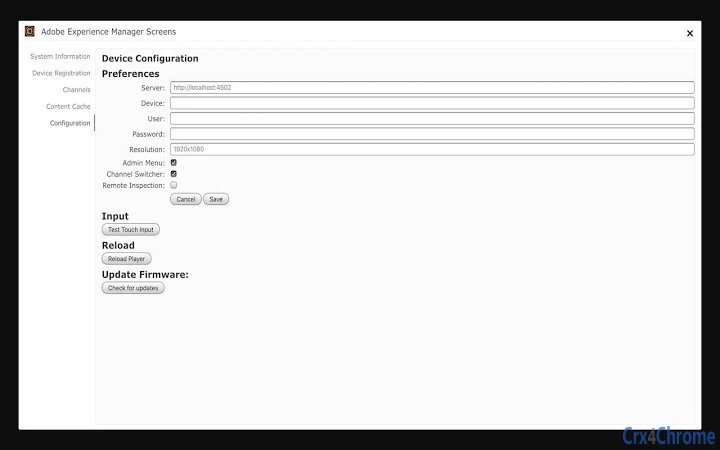
The AEM Screens application presents a minimal user interface, consistent with its role as a background playback engine. It does not include a rich graphical interface for end-users, focusing instead on reliable content rendering and playback. Navigation is handled through the AEM admin console, where users configure and manage content assignments.
Workflow efficiency is achieved through tight integration with AEM’s content lifecycle, allowing for scheduled content delivery, version control, and remote updates. The application runs in the background, consuming system resources only during active content playback. However, exact performance details such as CPU or RAM usage were not specified by the developer.
Stability is expected to be high, given its deployment in enterprise environments where uptime and reliability are critical. The application is designed to operate continuously without requiring user intervention. Performance observations are based on general software behavior patterns for enterprise digital signage players.
Compatibility & System Requirements
AEM Screens is compatible with Windows and Mac operating systems, supporting both desktop and laptop environments. The software requires a stable internet connection to communicate with the AEM server for content updates and synchronization. The installation size is 448.5 MB, which reflects the inclusion of playback components, media codecs, and integration libraries.
Exact system requirements were not listed by the developer. Compatibility with specific hardware configurations, such as GPU capabilities or display resolution support, was not detailed. The application is designed to work with AEM 6.5, 6.4.4 Screens FP4, and 6.3.3.3 Screens FP6, indicating it is tailored for enterprise environments with established AEM infrastructure.
Users should ensure their environment meets the underlying requirements of the supported AEM versions. The developer did not provide additional system requirements.
Pros and Cons
Pros
- Seamless integration with Adobe Experience Manager for centralized content control
- Supports interactive, touch-optimized experiences across multiple devices
- Enables location-specific content delivery for targeted messaging
- Designed for enterprise scalability and reliability
- Free to download and use with valid AEM licensing
Cons
- Requires a licensed AEM instance to function—cannot operate independently
- No standalone user interface for end-user configuration
- Limited to Windows and Mac platforms
- Compatibility depends on specific AEM version requirements
- Performance and resource usage details not publicly disclosed
FAQ Section
Is AEM Screens compatible with all versions of Adobe Experience Manager?
No. AEM Screens 1.0.204 is compatible with AEM versions 6.5, 6.4.4 Screens FP4, and 6.3.3.3 Screens FP6. It is not compatible with other AEM versions unless explicitly supported by Adobe.
Can I use AEM Screens without a paid AEM license?
No. The application requires a valid enterprise license for Adobe Experience Manager to function. It is not a standalone tool and cannot be used without a properly configured AEM instance.
Does AEM Screens require an internet connection?
Yes. The player needs a stable internet connection to communicate with the AEM server for content updates, synchronization, and remote management.
Is AEM Screens available for Linux or other operating systems?
Based on the provided information, AEM Screens is only available for Windows and Mac. There is no official support for Linux or other platforms.
How often does AEM Screens check for content updates?
The update frequency is determined by the configuration within the AEM admin console. It can be set to check for updates in real time, at scheduled intervals, or on demand.
Final Thoughts + CTA
AEM Screens is a powerful digital signage player tailored for enterprise users leveraging Adobe Experience Manager. Its seamless integration with AEM enables efficient, scalable management of large-screen content across diverse locations and devices. While it lacks standalone functionality and requires a robust AEM setup, its strengths lie in centralized control, interactive capabilities, and reliable playback.
It is best suited for organizations with existing AEM infrastructure seeking to enhance customer engagement through dynamic, touch-optimized displays. Professionals in retail, hospitality, corporate communications, and public information sectors will benefit most from its targeted content delivery and unified management.
Download AEM Screens now to unlock advanced digital signage capabilities within your AEM ecosystem.
Guides & Tutorials for AEM Screens Player App for Chrome
How to install AEM Screens Player App for Chrome
- Click the Preview / Download button above.
- Once redirected, accept the terms and click Install.
- Wait for the AEM Screens Player App for Chrome download to finish on your device.
How to use AEM Screens Player App for Chrome
This software is primarily used for its core features described above. Open the app after installation to explore its capabilities.
User Reviews for AEM Screens Player App for Chrome 0
No reviews found





